You can set up and run sensitivity simulations using the Sensitivity Control dialog as described above. You can also enter the control parameters directly into a file. The format for this file is:
#simulations , method={U|M|L|G|F} , seed , filename , warnings={0|1}
constant=distribution(min,max,...)
Where
•#simulations is a number specifying how many simulations to perform. If this number is not included, 200 simulations will be performed. This option is ignored when the F (File) method is active.
•method is a character indicating the method to use; Univariate, Multivariate, Latin Hypercube, Latin Grid, or File
•seed is the random noise seed to use. Normally this should be an integer between 1 and 231 (about 2E9), or 1 and 223 in single precision. The default is 1234. If seed is negative, the legacy LCG random number generator will be used. See NOISE RNG. If seed is 0, the seed will be nonreproducibly randomized (useful if you want to perform distinct samples on multiple computers without editing the control file for each). This option is ignored when the F (File) method is active.
•filename is used with the F method option to specify a file containing the sample to be evaluated (see below).
•warnings can be set to 0 or 1 to control the display of runtime warnings.
Example:
250,M,1234,,0
PRICE OF STEEL=RANDOM TRIANGULAR(.5,1.5,.5,1,1.5)
BUILDING TIME=RANDOM UNIFORM(11,15)
This would make 250 multivariate simulations, with warnings off, randomly changing both PRICE OF STEEL and BUILDING TIME.
The F (File) method requires a file containing the sample to be evaluated. This file must be a tab delimited text file (UTF8 for international characters). The first row should contain a header list of model constant names (tab delimited), with the corresponding values on each successive row. If a value is missing from this file the previously used value is repeated.
Example:
Filename: "myScenarios.tab"
price of steel<tab>building time<tab>NOISE SEED<return>
1.36<tab>12.2<tab>1<return>
1.5<tab>13.7<tab>2<return>
1.41<tab>11.1<tab>3<return>
This would generate three simulations with the given values for price of steel and building time, and varying the dynamic noise realizations of and RANDOM functions in the model through NOISE SEED.
Variables in the File
Variables in sensitivity files must be constants, and not unchangeable constants (defined with ==).
You can comment out columns in the input file by prefacing the variable name with #.
Certain special variable names will be passed through. This capability is primarily used for passing MCMC output to Sensitivity input:
Using MCMC output as Sensitivity input
Perhaps the most interesting use of the File option is to use your MCMC output as input to perform a sensitivity run that reflects the uncertainty in your posterior. This is easily done, using the .vsc file created by the MCMC run:
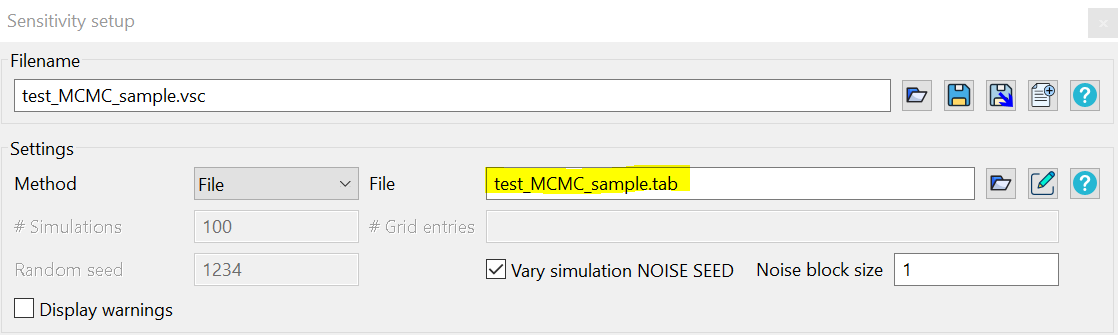
You can modify the .vsc to use the _clust.tab file rather than the fill sample. In this example,
•#Iteration will be ignored
•SIMULATION SAMPLE, SIMULATION WEIGHT, and SIMULATION PAYOFF will be passed through to the output if they exist as constants in the model; otherwise they will also be ignored.
•Reference wolf growth rate and columns to the right will be varied as parameters.
#Iteration |
SIMULATION SAMPLE |
SIMULATION WEIGHT |
SIMULATION PAYOFF |
Reference wolf growth rate |
Reference elk per wolf |
Relative initial elk |
Relative initial wolves |
21011 |
0 |
21 |
-163.154617446416 |
0.181167870045068 |
0.0839825899907462 |
1.04651580339544 |
1.35495859152137 |
21011 |
1 |
11 |
-164.46623744593 |
0.185626651771524 |
0.0991392172844691 |
1.08490712391562 |
1.60739841892317 |
21011 |
2 |
8 |
-164.910435257518 |
0.219461604637242 |
0.0888545649803058 |
1.14001621166526 |
1.38002635892095 |
21011 |
3 |
8 |
-166.66788162563 |
0.182743555089306 |
0.105136840128139 |
0.934422250412153 |
1.5064390543448 |
21011 |
4 |
14 |
-166.951781313076 |
0.241319097110687 |
0.0690919223551313 |
1.20300290174515 |
1.50661685723855 |
21011 |
5 |
7 |
-166.082420136443 |
0.151544101273831 |
0.0802762306479467 |
0.861665824312136 |
1.44716824259609 |
21011 |
6 |
3 |
-168.634544464185 |
0.244690838350862 |
0.0880968923306707 |
0.876528494410319 |
1.54666183483756 |
21011 |
7 |
4 |
-169.124599119063 |
0.24260493814868 |
0.0695947462611807 |
1.20197204524991 |
1.40411575126079 |
21011 |
8 |
13 |
-166.241038544752 |
0.257140732741041 |
0.11904702451896 |
1.02600318167318 |
1.32192450150437 |
21011 |
9 |
8 |
-166.766769458165 |
0.226679524197636 |
0.0902733489703357 |
0.923208113757163 |
1.31908993787521 |